
Referrals that actually close the loop
Need Navigator is case management software with a feature rich referrals module, crafted with input from social services case workers. Referrals integrate with your visits, needs, and tasks, giving you a more accurate story of how a person moved through your programs and partner agencies.
Whether you’re handing someone off to an internal program, a trusted community partner, or an organization that doesn’t use any software at all, Need Navigator keeps everyone on the same page.
Paper referrals that still talk to your system
Need to send someone to a partner who doesn’t use Need Navigator at all? You can still track the outcome without asking them to learn a new system.
From any referral, staff can print a simple, client-friendly referral document that includes key details plus a dynamic QR code.
-
When the receiving provider scans the QR code:
- They land on a secure page tied only to that one referral.
- They can confirm the person arrived.
- They can optionally add their name and a short note.
No login, no training, no extra account for them—just a quick scan on a phone. Need Navigator logs the confirmation and note in real time so your staff can see that the handoff actually happened.
It’s the best of both worlds: paper that works anywhere, backed by live data in your case management system.
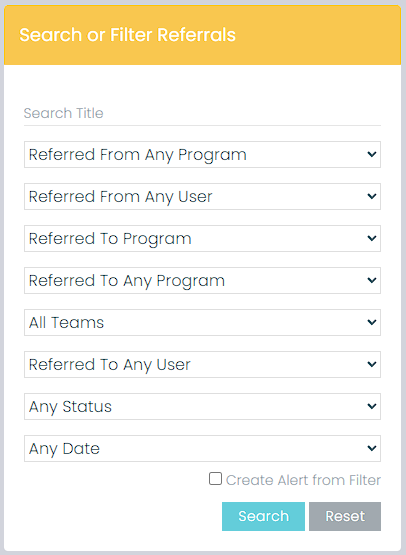
Powerful search & filters
Filter referrals by who sent them (program or user), where they were sent (program or external organization), status, and date range to get a clean view of referral activity across your network.
Save filters as alerts
Turn any set of filters into an alert so you’re notified when new referrals match your criteria—such as “Pending referrals sent to our shelter in the last 7 days.”

Need Navigator’s reporting engine lets you stack multiple conditions and filter referral data by fields like referral reason, status, program, or date range so you can answer day-to-day questions in seconds. Permissions and PII controls keep each report scoped to the right audience, and once you’ve tuned a report you can save, export, or quickly clone it for grants, board packets, or program check-ins—turning everyday casework into clear, defensible data without extra busywork.
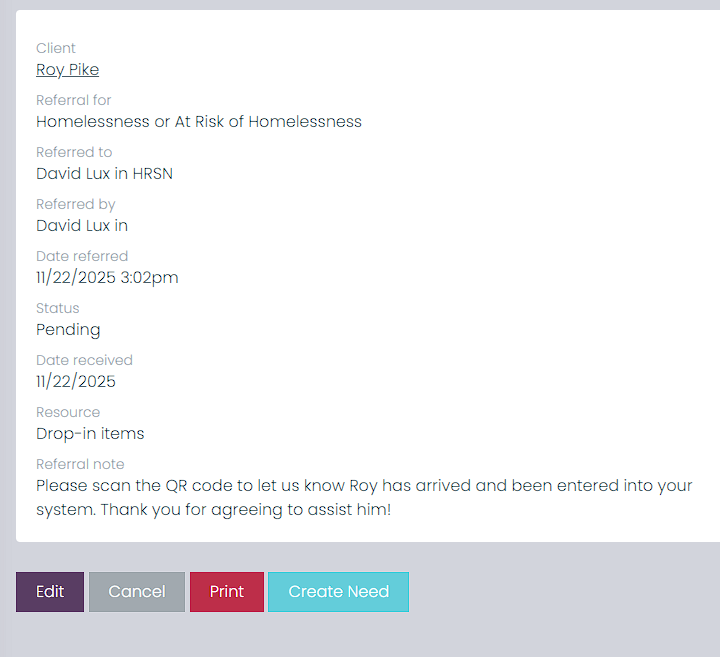
On the referral detail view, staff get everything they need in one place plus clear next steps. Quick-action buttons make it easy to update or cancel a referral, print a clean summary for your files or partners, or instantly create a new Need when it’s time to move from hand-off to active case management.
Why organizations choose Need Navigator for referrals
Organizations that switch to Need Navigator tell us they’re looking for more than just a place to “log” referrals. They need:
-
A single, integrated system for case management, referrals, shelters, and services.
-
A way to prove that referrals turned into real services, not just phone numbers handed out.
-
Tools that work with both sophisticated agency partners and small community providers with nothing more than a phone camera.
Need Navigator’s referral features are built specifically for human services teams that want a complete case management software with referrals—tools that help you coordinate care, close feedback loops, and tell a clearer story about the impact of your network.